🌐 中文 · 🌐 English · 🌐 Español · 🌐 Français · 🌐 العربية · 🌐 Русский · 🌐 Deutsch · 🌐 日本語 · 🌐 Tiếng Việt · 🌐 한국어
Installation
Download and Install Rime
- Download the latest version of Rime (Weasel / 小狼毫) for your operating system from the official Rime website and install it.
Install the Fengshui Input Method
-
Copy the five Fengshui input method files into the Rime installation folder (
…\Rime\weasel-0.14.3\data), overwriting the existing files.The default installation folder is:
C:\Program Files\Rime\weasel-0.14.3\dataThe five files:
default.yaml— default input method settingsweasel.yaml— input method interface settingsgeomancy.dict.yaml— Fengshui input method dictionary (157,000 words)geomancy.extended.dict.yaml— user custom dictionarygeomancy.schema.yaml— Fengshui input method behavior settings
-
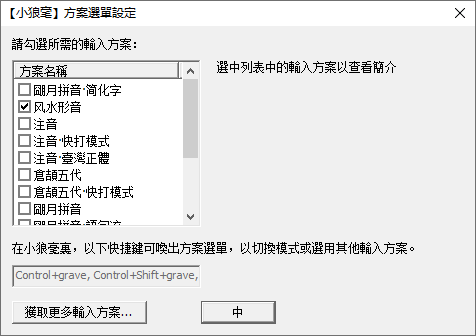
Click “Start” → “Weasel Input Method” (小狼毫输入法) → “Input Method Settings” (输入法设定).
-
Select “Fengshui Form-Phonetic” (风水形音) — click the “中” button to confirm.
-
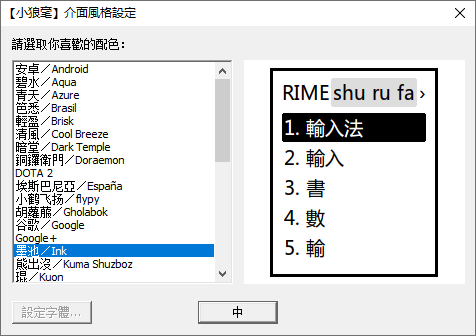
Choose an interface style you like, then click the “中” button to confirm.
-
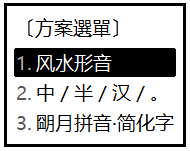
Press Ctrl + ` (located at the top-left corner) at the same time, then select “Fengshui Form-Phonetic” (风水形音) to finish setting up the input method.
-
Press Ctrl + Shift or Ctrl + Space to turn the input method on or off.
For more detailed usage, see the help on the official Rime website.
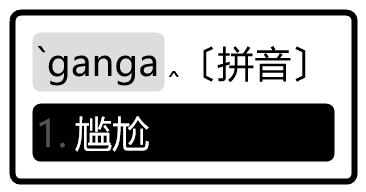
Switch to Pinyin Anytime
If you temporarily cannot recall the input code for a character or word, you can switch at any time to (` + pinyin) input.